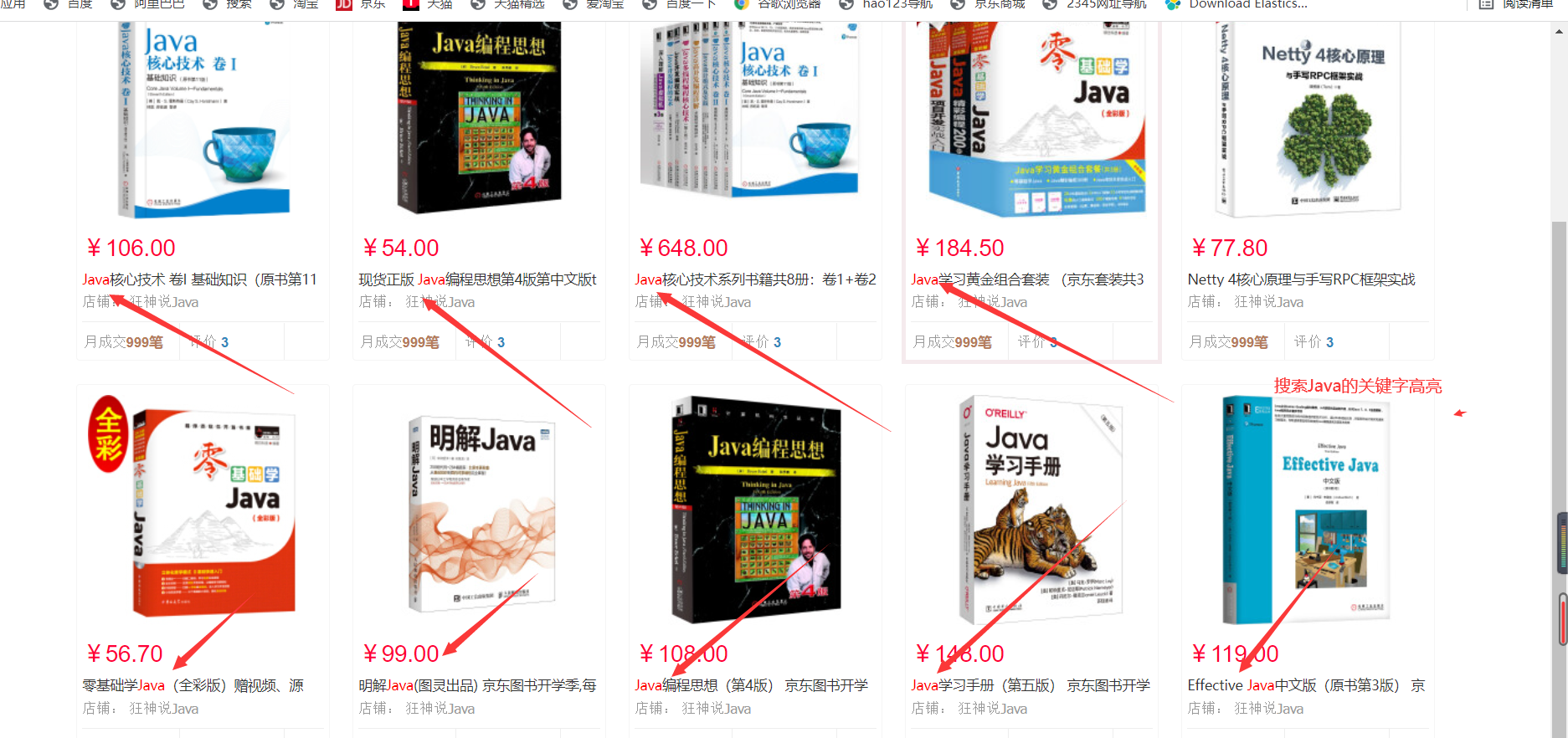
ElasticSearc实战仿照金东实现搜索
导入依赖基本测试
导入依赖
    <dependencies>
        <!--解析网页jSoup-->
        <dependency>
            <groupId>org.jsoup</groupId>
            <artifactId>jsoup</artifactId>
            <version>1.10.2</version>
        </dependency>
        <!--导入json-->
        <dependency>
            <groupId>com.alibaba</groupId>
            <artifactId>fastjson</artifactId>
            <version>1.2.78</version>
        </dependency>
        <!--导入elasticsearch-->
        <dependency>
            <groupId>org.springframework.boot</groupId>
            <artifactId>spring-boot-starter-data-elasticsearch</artifactId>
        </dependency>
        <!--thymeleaf-->
        <dependency>
            <groupId>org.springframework.boot</groupId>
            <artifactId>spring-boot-starter-thymeleaf</artifactId>
        </dependency>
        <!--web-->
        <dependency>
            <groupId>org.springframework.boot</groupId>
            <artifactId>spring-boot-starter-web</artifactId>
        </dependency>

        <dependency>
            <groupId>org.springframework.boot</groupId>
            <artifactId>spring-boot-devtools</artifactId>
            <scope>runtime</scope>
            <optional>true</optional>
        </dependency>
        <dependency>
            <groupId>org.springframework.boot</groupId>
            <artifactId>spring-boot-configuration-processor</artifactId>
            <optional>true</optional>
        </dependency>
        <!--lombok-->
        <dependency>
            <groupId>org.projectlombok</groupId>
            <artifactId>lombok</artifactId>
            <optional>true</optional>
        </dependency>
        <dependency>
            <groupId>org.springframework.boot</groupId>
            <artifactId>spring-boot-starter-test</artifactId>
            <scope>test</scope>
        </dependency>
application.preperties
# 更改端口,防止冲突
server.port=9090
# 关闭thymeleaf缓存
spring.thymeleaf.cache=false
测试controller和view
@Controller
public class IndexController {

   @RequestMapping({"/","/index"})
  public String index() {
     return "index";
  }
}
浏览器访问:http://localhost:9090/
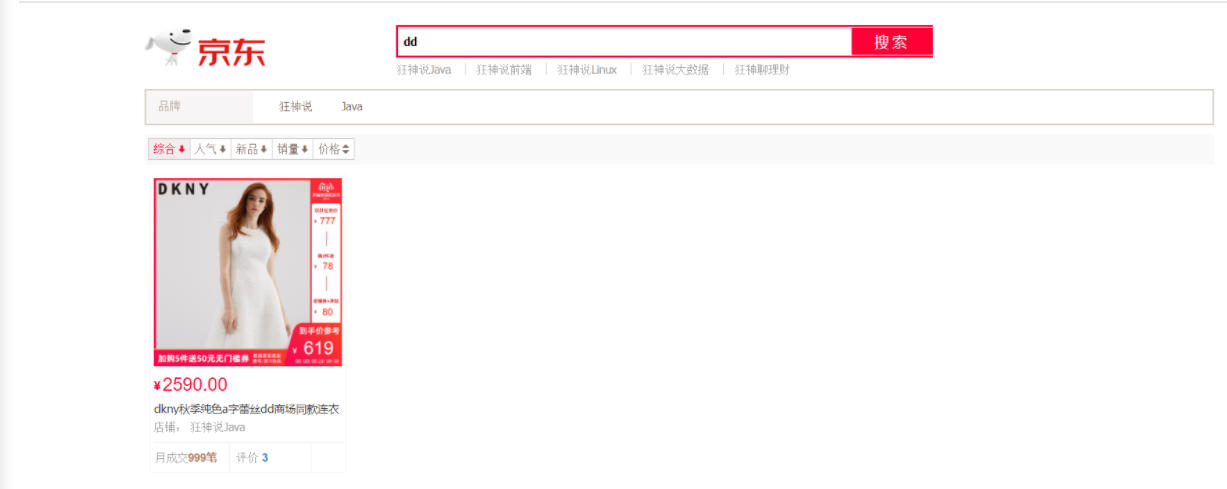
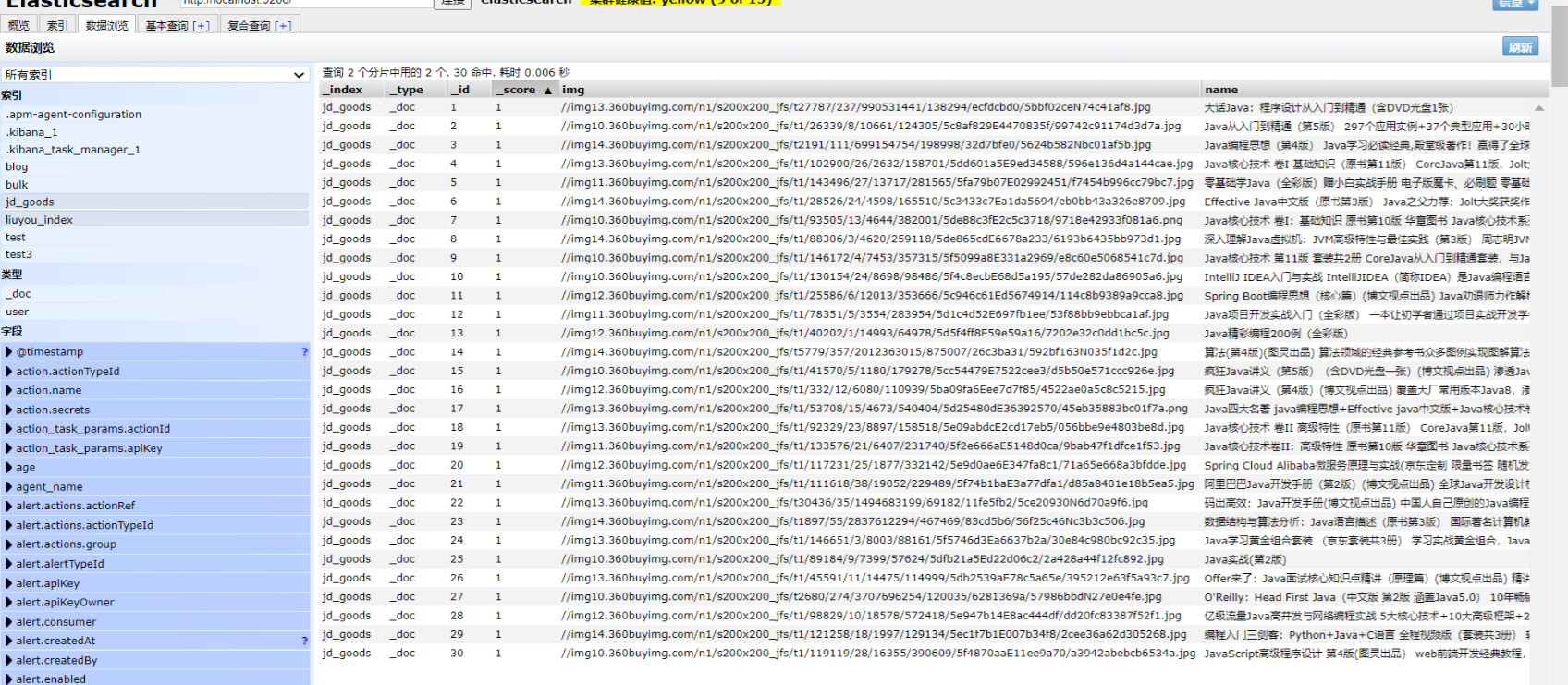
使用爬虫从金东是爬取数据
编写Config
/**
 * 配置ElasticSear配置文件
 */
@Configuration
public class ElasticSearConfig {

    @Bean
    public RestHighLevelClient restHighLevelClient() {
        RestHighLevelClient client = new RestHighLevelClient(
                RestClient.builder(
                        new HttpHost("127.0.0.1", 9200)
                ));
        return client;
    }
}
Content
package com.springbootjd.pojo;
import lombok.AllArgsConstructor;
import lombok.Data;
import lombok.NoArgsConstructor;

@Data
@NoArgsConstructor
@AllArgsConstructor
public class Content {
    private String title;
    private String img;
    private String price;
}
HtmlParseUtil
package com.springbootjd.utils;
import com.springbootjd.pojo.Content;
import org.jsoup.Jsoup;
import org.jsoup.nodes.Document;
import org.jsoup.nodes.Element;
import org.jsoup.select.Elements;
import org.springframework.context.annotation.Bean;
import org.springframework.context.annotation.Configuration;
import java.net.URL;
import java.util.ArrayList;
import java.util.List;
/**
*爬虫工具类
*/
@Configuration
public class HtmlParseUtil {

//    public static void main(String[] args) throws Exception {
//        new HtmlParseUtil().parseJD( "心理学").forEach(System.out::println);
//    }
    public List<Content> parseJD(String keywords) throws Exception {
        //网页请求:https://search.jd.com/Search?keyword=java
        //需要联网
        String url = "https://search.jd.com/Search?keyword="+keywords;
        //解析网页(jsoup返回Document就是浏览器Document对象)
        Document document = Jsoup.parse(new URL(url), 30000);
        //获取div元素
        Element element = document.getElementById("J_goodsList");
        //System.out.println(element);//输出div内容

        //获取li元素
        Elements elements = element.getElementsByTag("li");

        ArrayList<Content> goodsList = new ArrayList<>();
        // 获取京东的商品信息
        for (Element el : elements) {
            String img = el.getElementsByTag("img").eq(0).attr("data-lazy-img");
            String price = el.getElementsByClass("p-price").eq(0).text();
            String title = el.getElementsByClass("p-name").eq(0).text();

            // 封装获取的数据
            Content content = new Content();
            content.setImg(img);
            content.setPrice(price);
            content.setTitle(title);
            goodsList.add(content);
        }
        return goodsList;
    }

}
前后端交互以及高亮
ContentService
package com.springbootjd.service;
import com.alibaba.fastjson.JSON;
import com.springbootjd.pojo.Content;
import com.springbootjd.utils.HtmlParseUtil;
import org.elasticsearch.action.bulk.BulkRequest;
import org.elasticsearch.action.bulk.BulkResponse;
import org.elasticsearch.action.index.IndexRequest;
import org.elasticsearch.action.search.SearchRequest;
import org.elasticsearch.action.search.SearchResponse;
import org.elasticsearch.client.RequestOptions;
import org.elasticsearch.client.RestHighLevelClient;
import org.elasticsearch.common.text.Text;
import org.elasticsearch.common.unit.TimeValue;
import org.elasticsearch.common.xcontent.XContentType;
import org.elasticsearch.index.query.QueryBuilders;
import org.elasticsearch.index.query.TermQueryBuilder;
import org.elasticsearch.search.SearchHit;
import org.elasticsearch.search.builder.SearchSourceBuilder;
import org.elasticsearch.search.fetch.subphase.highlight.HighlightBuilder;
import org.elasticsearch.search.fetch.subphase.highlight.HighlightField;
import org.springframework.beans.factory.annotation.Autowired;
import org.springframework.stereotype.Service;
import java.io.IOException;
import java.util.ArrayList;
import java.util.List;
import java.util.Map;
import java.util.concurrent.TimeUnit;

@Service
public class ContentService {
    @Autowired
    private RestHighLevelClient restHighLevelClient;

    //将数据放入es索引中
    public Boolean parseContent(String keywords) throws Exception {
        //获取内容
        List<Content> contents = new HtmlParseUtil().parseJD(keywords);

        //讲查询的数据放到es中
        BulkRequest bulkRequest = new BulkRequest();
        bulkRequest.timeout("2m");//设置两分钟过时

        for (int i = 0; i <contents.size() ; i++) {
            bulkRequest.add(
              new IndexRequest("jd_goods")//新增的数据库,前提,需要创建数据库
              .source(JSON.toJSONString(contents.get(i)), XContentType.JSON)
            );
        }
        BulkResponse bulk = restHighLevelClient.bulk(bulkRequest, RequestOptions.DEFAULT);
        return !bulk.hasFailures();
    }

    // 2、实现搜索功能,带分页处理
    public List<Map<String, Object>> searchContentPage(String keyword, int pageNo, int pageSize) throws IOException {
        // 基本的参数判断!
        if(pageNo <= 1){
            pageNo = 1;
        }
        //条件搜索
        SearchRequest searchRequest = new SearchRequest("jd_goods");
        SearchSourceBuilder searchSourceBuilder = new SearchSourceBuilder();

        //分页
        searchSourceBuilder.from(pageNo);
        searchSourceBuilder.size(pageSize);

        //精准匹配
        TermQueryBuilder title = QueryBuilders.termQuery("title", keyword);
        searchSourceBuilder.query(title);
        searchSourceBuilder.timeout(new TimeValue(60,TimeUnit.SECONDS));//60秒过期

        //高亮
        HighlightBuilder highlightBuilder = new HighlightBuilder();
        highlightBuilder.field("title");//设置高亮的字段
        highlightBuilder.requireFieldMatch(false);//关闭多个高亮
        highlightBuilder.preTags("<span style='color:red'>");//设置前缀
        highlightBuilder.postTags("</span>");//设置后缀
        searchSourceBuilder.highlighter(highlightBuilder);

        //精确匹配,执行搜索
        searchRequest.source(searchSourceBuilder);
        SearchResponse search = restHighLevelClient.search(searchRequest, RequestOptions.DEFAULT);

        //解析结果
        ArrayList<Map<String, Object>> list = new ArrayList<>();
        for (SearchHit hit : search.getHits().getHits()) {
            //获取高亮字段
            Map<String, HighlightField> highlightFields = hit.getHighlightFields();
            HighlightField titleField = highlightFields.get("title");//获得高亮字段
           //获得原来的结果
            Map<String, Object> source = hit.getSourceAsMap();
            //千万记得要记得判断是不是为空,不然你匹配的第一个结果没有高亮内容,那么就会报空指针异常,这个错误一开始真的搞了很久
            if(titleField!=null){
                Text[] fragments = titleField.fragments();//获得高亮title
                String name = "";
                for (Text text : fragments) {//循环输出高亮字段
                    name += text;
                }
                source.put("title", name);   //高亮字段替换掉原本的内容
            }
            list.add(source);
        }
        return list;
    }
}
ContentController
package com.springbootjd.controller;
import com.springbootjd.service.ContentService;
import org.springframework.beans.factory.annotation.Autowired;
import org.springframework.web.bind.annotation.GetMapping;
import org.springframework.web.bind.annotation.PathVariable;
import org.springframework.web.bind.annotation.RestController;

import java.util.List;
import java.util.Map;

@RestController
public class ContentController {
    @Autowired
    private ContentService contentService;

    @GetMapping("/parse/{keyword}")
    public Boolean parse(@PathVariable("keyword") String keyword) throws Exception {
        return contentService.parseContent(keyword);
    }


    //http://localhost:9090/search/java/1/10
    @GetMapping("/search/{keyword}/{pageNo}/{pageSize}")
    public List<Map<String, Object>> search(@PathVariable("keyword") String keyword,
                                            @PathVariable("pageNo") int pageNo,
                                            @PathVariable("pageSize") int pageSize) throws Exception {

        return contentService.searchContentPage(keyword, pageNo, pageSize);
    }
}
index.html
<!DOCTYPE html>
<html xmlns:th="http://www.thymeleaf.org">

<head>
    <meta charset="utf-8"/>
    <title>狂神说Java-ES仿京东实战</title>
    <link rel="stylesheet" th:href="@{/css/style.css}"/>
</head>
<body class="pg">
<div class="page">
    <div id="mallPage" class=" mallist tmall- page-not-market ">

        <div id="app">
            <!-- 头部搜索 -->
            <div id="header" class=" header-list-app">
                <div class="headerLayout">
                    <div class="headerCon ">
                        <!-- Logo-->
                        <h1 id="mallLogo">
                            <img th:src="@{/images/jdlogo.png}" alt="">
                        </h1>

                        <div class="header-extra">

                            <!--搜索-->
                            <div id="mallSearch" class="mall-search">
                                <form name="searchTop" class="mallSearch-form clearfix">
                                    <fieldset>
                                        <legend>天猫搜索</legend>
                                        <div class="mallSearch-input clearfix">
                                            <div class="s-combobox" id="s-combobox-685">
                                                <div class="s-combobox-input-wrap">
                                                    <input v-model="keyword" type="text" autocomplete="off" value="dd" id="mq"
                                                           class="s-combobox-input" aria-haspopup="true">
                                                </div>
                                            </div>
                                            <button type="submit" id="searchbtn" @click.prevent="searchKey">搜索</button>
                                        </div>
                                    </fieldset>
                                </form>
                                <ul class="relKeyTop">
                                    <li><a>狂神说Java</a></li>
                                    <li><a>狂神说前端</a></li>
                                    <li><a>狂神说Linux</a></li>
                                    <li><a>狂神说大数据</a></li>
                                    <li><a>狂神聊理财</a></li>
                                </ul>
                            </div>
                        </div>
                    </div>
                </div>
            </div>

            <!-- 商品详情页面 -->
            <div id="content">
                <div class="main">
                    <!-- 品牌分类 -->
                    <form class="navAttrsForm">
                        <div class="attrs j_NavAttrs" style="display:block">
                            <div class="brandAttr j_nav_brand">
                                <div class="j_Brand attr">
                                    <div class="attrKey">
                                        品牌
                                    </div>
                                    <div class="attrValues">
                                        <ul class="av-collapse row-2">
                                            <li><a href="#"> 狂神说 </a></li>
                                            <li><a href="#"> Java </a></li>
                                        </ul>
                                    </div>
                                </div>
                            </div>
                        </div>
                    </form>

                    <!-- 排序规则 -->
                    <div class="filter clearfix">
                        <a class="fSort fSort-cur">综合<i class="f-ico-arrow-d"></i></a>
                        <a class="fSort">人气<i class="f-ico-arrow-d"></i></a>
                        <a class="fSort">新品<i class="f-ico-arrow-d"></i></a>
                        <a class="fSort">销量<i class="f-ico-arrow-d"></i></a>
                        <a class="fSort">价格<i class="f-ico-triangle-mt"></i><i class="f-ico-triangle-mb"></i></a>
                    </div>

                    <!-- 商品详情 -->
                    <div class="view grid-nosku">

                        <div class="product" v-for="result in results">
                            <div class="product-iWrap">
                                <!--商品封面-->
                                <div class="productImg-wrap">
                                    <a class="productImg">
                                        <img :src="result.img">
                                    </a>
                                </div>
                                <!--价格-->
                                <p class="productPrice">
                                    <em> {{result.price}} </em>
                                </p>
                                <!--标题-->
                                <p class="productTitle">
                                    <a v-html="result.title"> </a>
                                </p>
                                <!-- 店铺名 -->
                                <div class="productShop">
                                    <span>店铺: 狂神说Java </span>
                                </div>
                                <!-- 成交信息 -->
                                <p class="productStatus">
                                    <span>月成交<em>999笔</em></span>
                                    <span>评价 <a>3</a></span>
                                </p>
                            </div>
                        </div>
                    </div>
                </div>
            </div>
        </div>
    </div>
</div>

<script th:src="@{/js/axios.js}"></script>
<script th:src="@{/js/vue.min.js}"></script>
<script>
  new Vue({
     el : "#app",
      data : {
        keyword : "", //搜索的关键子
        results: []   //搜索的结果
      },
      mounted(){

      },
      methods : {
          searchKey(){
           let keyword=this.keyword;
           console.log(keyword);
           //和和后端对接的接口
              axios.get("search/"+keyword+"/1/10").then(response=>{
                  console.log(response);
                  this.results=response.data;//绑定数据
              })
          }
      }
  })
</script>

</body>
</html>