RabbitMQ发布确认(高级)
发布确认高级(基本介绍)
在生产环境中由于一些不明原因,导致rabbitmq.重启,在RabbitMQ重启期间生产者消息投递失败,导致消息丢失,需要手动处理和恢复。于是,我们开始思考,如何才能进行RabbitMQ的消息可靠投递呢?特别是在这样比较极端的情况,RabbitMQ集群不可用的时候,无法投递的消息该如何处理呢:
确认机制方案
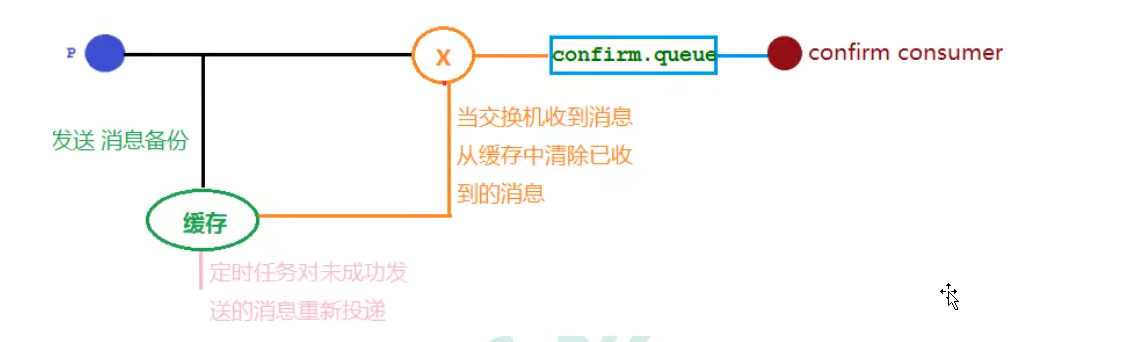
代码架构图

发布确认高级(配置类)
在配置文件当中需要添加
spring.rabbitmq.publisher-confirm-type=correlated
NONE:禁用发布确认模式,是默认值
CORRELATED:发布消息成功到交换器后会触发回调方法
SIMPLE:经测试有两种效果,其一效果和CORRELATED值一样会触发回调方法,其二在发布消息成功后使用rabbitTemplate,调用waitForConfirms.或 waitForConfirmsOrDie.方法等待broker节点返回发送结果,根据返回结果来判定下一步的逻辑,要注意的点是waitForConfirmsOrDie方法如果返回false则会关闭channel,则接下来无法发送消息到broker
package com.springbootrabbitmq.config;
import org.springframework.amqp.core.*;
import org.springframework.beans.factory.annotation.Qualifier;
import org.springframework.context.annotation.Bean;
import org.springframework.context.annotation.Configuration;

/**
 * 配置类 发布确认  (高级)
 */
@Configuration
public class ConfirmConfig {
    //交换机
    public static final String CONFIRM_EXCHANGE_NAME = "confirm_exchange";
    //队列
    public static final String CONFIRM_QUEUE_NAME = "confirm_queue";
    //RoutingKey
    public static final String CONFIRM_ROUTING_KET_="key1";

    //声明交换机
    @Bean("confirmExchange")
    public DirectExchange confirmExchange(){
       return new DirectExchange(CONFIRM_EXCHANGE_NAME);
    }
    @Bean("confirmQueue")
    public Queue confirmQueue() {
     return QueueBuilder.durable(CONFIRM_QUEUE_NAME).build();
    }

    //绑定
    @Bean
    public Binding queueBindingExchange(@Qualifier("confirmQueue") Queue confirmQueue,
                                        @Qualifier("confirmExchange") DirectExchange confirmExchange){
        return BindingBuilder.bind(confirmQueue).to(confirmExchange).with(CONFIRM_ROUTING_KET_);

    }
}
发布确认高级(生产者和消费者)
package com.springbootrabbitmq.controller;
import com.springbootrabbitmq.config.ConfirmConfig;
import lombok.extern.slf4j.Slf4j;
import org.springframework.amqp.rabbit.core.RabbitTemplate;
import org.springframework.beans.factory.annotation.Autowired;
import org.springframework.stereotype.Controller;
import org.springframework.web.bind.annotation.GetMapping;
import org.springframework.web.bind.annotation.PathVariable;
import org.springframework.web.bind.annotation.RestController;

/**
 * 发布确认高级 (生产者)
 */
@Slf4j
@RestController
@Controller
public class ProducerController {

    @Autowired
    private  RabbitTemplate rabbitTemplate;

    //发消息
    @GetMapping("/sendMessage/{message}")
    public void sendMessage(@PathVariable String message){
        rabbitTemplate.convertAndSend(ConfirmConfig.CONFIRM_EXCHANGE_NAME,ConfirmConfig.CONFIRM_ROUTING_KET_,message);
        log.info("发送的消息为:{}",message);
    }
}
package com.springbootrabbitmq.consumer;
import com.springbootrabbitmq.config.ConfirmConfig;
import lombok.extern.slf4j.Slf4j;
import org.springframework.amqp.core.Message;
import org.springframework.amqp.rabbit.annotation.RabbitListener;
import org.springframework.stereotype.Component;

/**
 * 接收消息(消费者)
 */
@Component
@Slf4j
public class Consumer {
  @RabbitListener(queues = ConfirmConfig.CONFIRM_QUEUE_NAME)
    public void receiveMessage(Message message){
      String msg=new String(message.getBody());
      log.info("接收confirm.queue消息:{}",msg);
  }
}
发布确认高级(回调接口)
package com.springbootrabbitmq.config;
import lombok.extern.slf4j.Slf4j;
import org.springframework.amqp.rabbit.connection.CorrelationData;
import org.springframework.amqp.rabbit.core.RabbitTemplate;
import org.springframework.beans.factory.annotation.Autowired;
import org.springframework.stereotype.Component;
import javax.annotation.PostConstruct;
/**
*回调接口配置类
*/
@Component
@Slf4j
public class MyCallBackConfig implements RabbitTemplate.ConfirmCallback {

    @Autowired
    private  RabbitTemplate rabbitTemplate;

    //注入
    // @PostConstruct 在之后执行
    @PostConstruct
    public void init(){
        rabbitTemplate.setConfirmCallback(this);
    }

    /**
     *交换机确认回调的方法
     * 1.发消息 交换机收到了 回调
     * 1.1  correlationData 保存回调消息的ID级相关信息
     * 1.2 交换机收到的消息 ack= true
     * 1.3 cause null
     * 2.发消息 交换机失败了 回调
     * 2.1 correlationData 保存回调的ID级相关消息
     * 2.2 交换机接收到的消息 ack=false
     * 2.3 cause 失败的原因
     */
    @Override
    public void confirm(CorrelationData correlationData, boolean ack, String cause) {
        String id=correlationData!=null?correlationData.getId() : "";
        if (ack) {
            log.info("交换机已收到id:{}消息",id);
        }else {
            log.info("交换机未收到id:{}消息,由于原因:{}",id,cause);
        }
    }
}
发布确认高级(交换机确认)
修改生产者
/**
 * 发布确认高级 (生产者)
 */
@Slf4j
@RestController
@Controller
public class ProducerController {

    @Autowired
    private  RabbitTemplate rabbitTemplate;

    //发消息
    @GetMapping("/sendMessage/{message}")
    public void sendMessage(@PathVariable String message){
        //confirm.queue可以接收到消息的
        CorrelationData correlationData = new CorrelationData("1");
        rabbitTemplate.convertAndSend(ConfirmConfig.CONFIRM_EXCHANGE_NAME,
                ConfirmConfig.CONFIRM_ROUTING_KET_,message+"k1",correlationData);
        log.info("发送的消息为:{}",message+"key1");
        //confirm.queue不能接收到消息的
        CorrelationData correlationData2 = new CorrelationData("2");
        rabbitTemplate.convertAndSend(ConfirmConfig.CONFIRM_EXCHANGE_NAME,
                ConfirmConfig.CONFIRM_ROUTING_KET_+"2",message+"k12",correlationData2);
        log.info("发送的消息为:{}",message+"k12");
    }
}
发布确认高级(回退消息)
在仅开启了生产者确认机制的情况下,交换机接收到消息后,会直接给消息生产者发送确认消息,如果发现该消息不可路由,那么消息会被直接丢弃,此时生产者是不知道消息楸去弃这个事件时。那么如让无法被路由的消息帮我想办法处理一下?最起码通知我一声,我好自己处理啊。通过设置mandatory参数可以在当消息传递过程中不可达目的地时将消息返回给生产者。
#开启回退消息
spring.rabbitmq.publisher-returns=true
修改MyCallBackConfig
package com.springbootrabbitmq.config;

import lombok.extern.slf4j.Slf4j;
import org.springframework.amqp.core.Message;
import org.springframework.amqp.rabbit.connection.CorrelationData;
import org.springframework.amqp.rabbit.core.RabbitTemplate;
import org.springframework.beans.factory.annotation.Autowired;
import org.springframework.stereotype.Component;

import javax.annotation.PostConstruct;

@Component
@Slf4j
public class MyCallBackConfig implements RabbitTemplate.ConfirmCallback,RabbitTemplate.ReturnCallback {

    @Autowired
    private  RabbitTemplate rabbitTemplate;

    //注入
    @PostConstruct
    public void init(){
        rabbitTemplate.setConfirmCallback(this);
        rabbitTemplate.setReturnCallback(this);
    }

    /**
     *交换机确认回调的方法
     * 1.发消息 交换机收到了 回调
     * 1.1  correlationData 保存回调消息的ID级相关信息
     * 1.2 交换机收到的消息 ack= true
     * 1.3 cause null
     * 2.发消息 交换机失败了 回调
     * 2.1 correlationData 保存回调的ID级相关消息
     * 2.2 交换机接收到的消息 ack=false
     * 2.3 cause 失败的原因
     */
    @Override
    public void confirm(CorrelationData correlationData, boolean ack, String cause) {
        String id=correlationData!=null?correlationData.getId() : "";
        if (ack) {
            log.info("交换机已收到id:{}消息",id);
        }else {
            log.info("交换机未收到id:{}消息,由于原因:{}",id,cause);
        }
    }

//可以在当消息传递过程中不可达目的地时将消息返回给生产者
// 只有不可达目的地的时候才进行回退
    @Override
    public void returnedMessage(Message message, int replyCode, String replyText, String exchange, String routingKey) {
       log.error("消息{},被交换机{}退回,退回原因:{},路由Key:{}",
               new String(message.getBody()),exchange,replyText,routingKey);
    }
}