   //Spring自带的默认加密器
   //简单的MD5加密容易被暴力破解
     String s = DigestUtils.md5Hex("123456");
        System.out.println(s);
        System.out.println(Md5Crypt.md5Crypt("123456".getBytes()));
        System.out.println(Md5Crypt.md5Crypt("123456".getBytes(),"$1$qqqqqqqq"));
       //采用Spring Boot的默认的一个盐值加密算法,每次都生成不同的加密字符
        BCryptPasswordEncoder bCryptPasswordEncoder = new BCryptPasswordEncoder();
        //$2a$10$GT0TjB5YK5Vx77Y.2N7hkuYZtYAjZjMlE6NWGE2Aar/7pk/Rmhf8S
        //$2a$10$cR3lis5HQQsQSSh8/c3L3ujIILXkVYmlw28vLA39xz4mHDN/NBVUi
        String encode = bCryptPasswordEncoder.encode("123456");  //加密算法
        boolean matches = bCryptPasswordEncoder.matches("123456", "$2a$10$GT0TjB5YK5Vx77Y.2N7hkuYZtYAjZjMlE6NWGE2Aar/7pk/Rmhf8S"); //解密

        System.out.println(encode+"==>" + matches);
一个简单的密码加密登录校验
    /**
     * 用户登录
     * @param vo
     * @return
     */
    @Override
    public MemberEntity login(MemberUserLoginVo vo) {
        String loginacct = vo.getLoginacct();
        String password = vo.getPassword();

        MemberDao memberDao= this.baseMapper;
        //手机号和用户名有一个匹配即可
        MemberEntity entity = memberDao.selectOne(new QueryWrapper<MemberEntity>()
                .eq("username", loginacct)
                .or().eq("mobile", loginacct));
        if (entity==null) {
            //登录失败
            return null;
        }else {
            //获取到数据的password 与我们加密的密码进行比较
            String passwordDb = entity.getPassword();
            BCryptPasswordEncoder passwordEncoder = new BCryptPasswordEncoder();
            //密码匹配
            boolean matches = passwordEncoder.matches(password, passwordDb);
            if (matches) {
                return entity;
            }else {
                return null;
            }

        }
    }
分布式session简单使用
官网:https://docs.spring.io/spring-session/docs/2.1.2.RELEASE/reference/html5/guides/boot-redis.html
导入依赖
<!--springSession 解决session共享问题-->
 <dependency>
     <groupId>org.springframework.session</groupId>
     <artifactId>spring-session-data-redis</artifactId>
 </dependency>
application.properties
spring.redis.port=6379
spring.redis.host=127.0.0.1

#设置共享方式为redis
spring.session.store-type=redis
#设置session过期时间为30分钟
server.servlet.session.timeout=30m
启动类
@SpringBootApplication
@EnableRedisHttpSession  //整合redis作为session存贮
public class GulimallAuthServerApplication {

    public static void main(String[] args) {
        SpringApplication.run(GulimallAuthServerApplication.class, args);
    }

}
可以将session存储在公共模块中:直接在页面进行取出即可,假如有模块要用到session都要加入以配置进行取出即可
使用httpSession进行存储即可
    @PostMapping(value = "/login")
    public String login(UserLoginVo vo, RedirectAttributes attributes, HttpSession session) {

        //远程登录
        R login = memberFeignService.login(vo);

        if (login.getCode() == 0) {
            MemberResponseVo data = login.getData("data", new TypeReference<MemberResponseVo>() {});
            //TODo 1、默认发的令牌。session=dsajkdjL。作用域:当前域;(解决子域session共享问题)
            // T0Do 2、使用JsON的序列化方式来序列化对象数据到redis中
            session.setAttribute(LOGIN_USER,data);
            return "redirect:http://gulimall.com";
        } else {
            Map<String,String> errors = new HashMap<>();
            errors.put("msg",login.getData("msg",new TypeReference<String>(){}));
            attributes.addFlashAttribute("errors",errors);
            return "redirect:http://auth.gulimall.com/login.html";
        }
    }
}
<a th:if="${session.loginUser != null}">欢迎, [[${session.loginUser.nickname}]]</a>
配置类,在登陆页面和商品服务都要加时配置类否则会取不出来
/**
 * 自定义session,放大作用域
 */

@Configuration
public class GulimallSessionConfig {

    @Bean
    public CookieSerializer cookieSerializer() {

        DefaultCookieSerializer cookieSerializer = new DefaultCookieSerializer();

        //放大作用域
        cookieSerializer.setDomainName("gulimall.com");   //指定session的作用域 ,对应的域名 ,子域名  list.gulimall.com ,serch.gulimall.com 都能接收到父域名的数据
        cookieSerializer.setCookieName("GULISESSION");   //自定义的名称

        return cookieSerializer;
    }


    @Bean
    public RedisSerializer<Object> springSessionDefaultRedisSerializer() {
        return new GenericJackson2JsonRedisSerializer();
    }

}
单点登录流程图
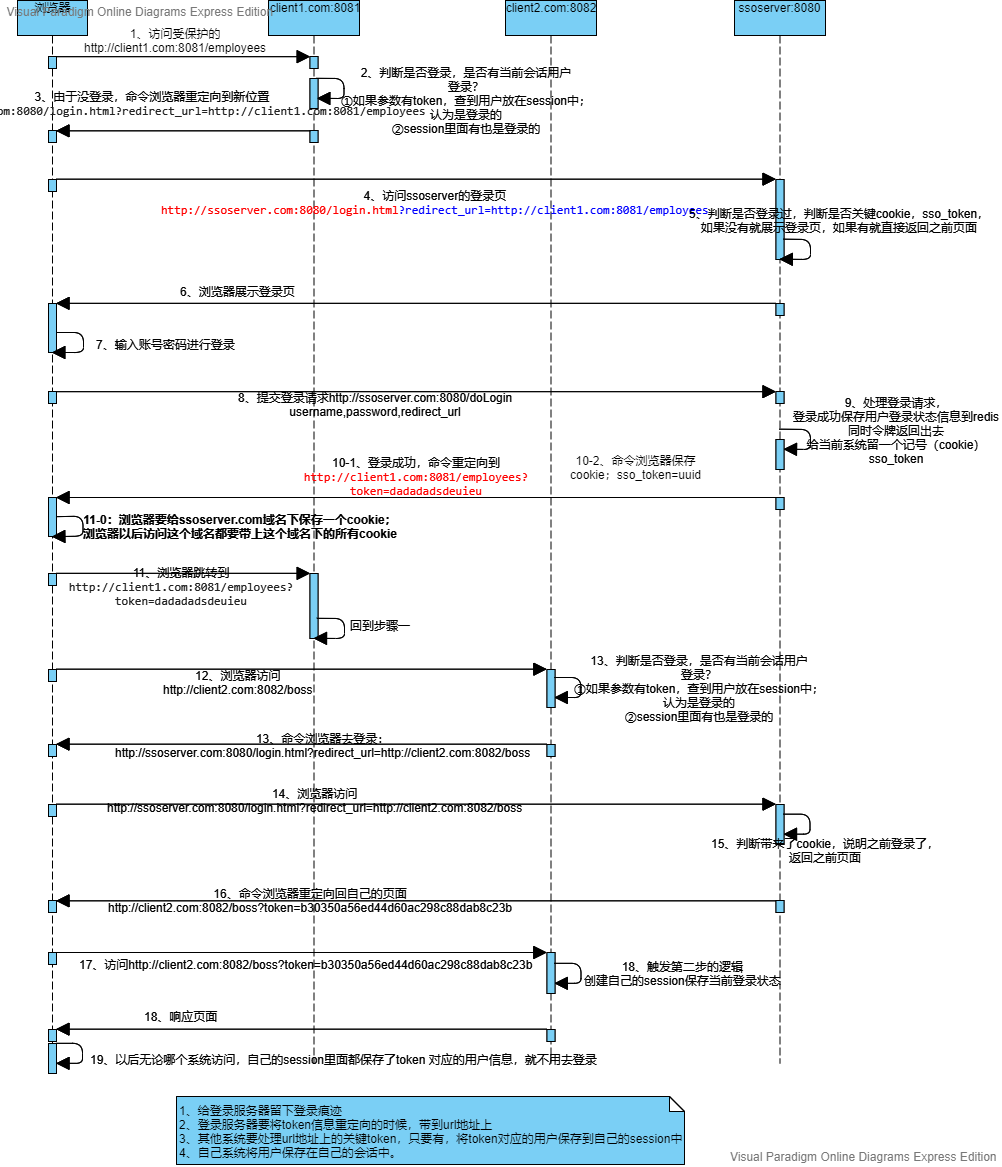
在本机的hosts配置
#单点登录测试配置 127. 0.0.1 sso.com 127. 0.0.1 client1.com 127. 0.0.1 client2.com
单点登录服务端
LoginController
@Controller
public class LoginController {

    @Resource
    private RedisTemplate redisTemplate;

    @GetMapping("/userinfo")
    @ResponseBody
    public String userInfo(@RequestParam("token") String token){
        return (String) redisTemplate.opsForValue().get(token);
    }


    @GetMapping("/login.html")
    public String loginPage(@RequestParam("redirect_url") String url, Model model,
                            @CookieValue(value = "sso_token",required = false) String sso_token) {
        if (!StringUtils.isEmpty(sso_token)) {
            //如果cookie不为空是说明以前是有人登录过的,在浏览器留下的痕迹
            return "redirect:"+url+"?token="+sso_token;
        }
        //否则跳转到登录页面
        model.addAttribute("url",url);
        return "login";
    }

    @PostMapping("/doLogin")
    public String login(@RequestParam("username")String username,
                        @RequestParam("password") String password,
                        @RequestParam("redirect_url") String url,
                        HttpServletResponse response) {
        if (!StringUtils.isEmpty(username) && !StringUtils.isEmpty(password)) {
            //登录成功跳转,保存的用户保存起来
            String uuid = UUID.randomUUID().toString().replace("-", "");
            redisTemplate.opsForValue().set(uuid,username);
            Cookie sso_cookie = new Cookie("sso_token",uuid);
            response.addCookie(sso_cookie);
            return "redirect:" + url + "?token=" + uuid;
        }
        //登录失败跳转
        return "login";
    }

}
login.html
<!DOCTYPE html>
<html lang="en">
<head>
    <meta charset="UTF-8">
    <title>登录页</title>
</head>
<body>
    <form action="/doLogin" method="post">
        用户名:<input type="text" name="username" /><br />
        密码:<input type="password" name="password" /><br />
        <input type="hidden" name="redirect_url" value="http://localhost:8081/employees" />
        <input type="submit" value="登录">
    </form>
</body>
</html>
application.properties
server.port=8080

spring.redis.port=6379
spring.redis.host=127.0.0.1
单点登录客户端1
HelloController
@Controller
public class HelloController {

    @Value("${sso.server.url}")
    private String ssoServerUrl;

    /**
     * 无需登录就可以访问
     * @return
     */
    @RequestMapping("/hello")
    @ResponseBody
    public String hello() {
        return "hello";
    }

    /**
     * 感知这次实在ssoserver登录成功跳回来的
     * @param model
     * @param session
     * token 只要去ssoserver登录成功就会回来带上
     * @return
     */
    @GetMapping("/employees")
    public String employees(Model model, HttpSession session,
                            @RequestParam(value = "token", required = false) String token){
        if (!StringUtils.isEmpty(token)) {
            //去ssoserver登录成功就会回来带上
            //TODO 1,去ssoserver获取当前的token真正对应的用户信息
            RestTemplate restTemplate=new RestTemplate();
            ResponseEntity<String> forEntity = restTemplate.getForEntity("http://sso.com:8080/userinfo?token=" + token, String.class);
            String body = forEntity.getBody();

            session.setAttribute("loginUser", body);
        }

        String loginUser = (String) session.getAttribute("loginUser");
        if (loginUser==null){
            //没有登录,跳转到登录服务器进行登录
            //跳转过去以后,使用url上的查询参数标识我们自己是哪个页面
            // redirect_urL=http://client1.com:8880/employees
            return "redirect:http://sso.com:8080/login.html?redirect_url=http://localhost:8081/employees";
        }else {
            ArrayList<String> employe = new ArrayList<>();
            employe.add("张三");
            employe.add("李四");
            model.addAttribute("emps",employe);
            return "list";
        }
    }
}
application.properties
server.port=8081

sso.server.url="http://sso.com:8080/login.html"
list.html
<!DOCTYPE html>
<html lang="en" xmlns:th="http://www.thymeleaf.org">
<head>
    <meta charset="UTF-8">
    <title>员工列表</title>
</head>
<body>
    <h1>欢迎:[[${session.loginUser}]]</h1>
    <ul>
        <li th:each="emp:${emps}">姓名:[[${emp}]]</li>
    </ul>
</body>
</html>
单点登录客户端2
HelloController
package com.yuan.gulimall.ssoclient.controller;

import org.springframework.beans.factory.annotation.Value;
import org.springframework.http.ResponseEntity;
import org.springframework.stereotype.Controller;
import org.springframework.ui.Model;
import org.springframework.util.StringUtils;
import org.springframework.web.bind.annotation.GetMapping;
import org.springframework.web.bind.annotation.RequestMapping;
import org.springframework.web.bind.annotation.RequestParam;
import org.springframework.web.bind.annotation.ResponseBody;
import org.springframework.web.client.RestTemplate;

import javax.servlet.http.HttpSession;
import javax.xml.ws.RespectBinding;
import java.util.ArrayList;

@Controller
public class HelloController {

    @Value("${sso.server.url}")
    private String ssoServerUrl;

    /**
     * 无需登录就可以访问
     * @return
     */
    @RequestMapping("/hello")
    @ResponseBody
    public String hello() {
        return "hello";
    }

    /**
     * 感知这次实在ssoserver登录成功跳回来的
     * @param model
     * @param session
     * token 只要去ssoserver登录成功就会回来带上
     * @return
     */
    @GetMapping("/boos")
    public String employees(Model model, HttpSession session,
                            @RequestParam(value = "token", required = false) String token){
        if (!StringUtils.isEmpty(token)) {
            //去ssoserver登录成功就会回来带上
            //TODO 1,去ssoserver获取当前的token真正对应的用户信息
            RestTemplate restTemplate=new RestTemplate();
            ResponseEntity<String> forEntity = restTemplate.getForEntity("http://sso.com:8080/userinfo?token=" + token, String.class);
            String body = forEntity.getBody();

            session.setAttribute("loginUser", body);
        }

        String loginUser = (String) session.getAttribute("loginUser");
        if (loginUser==null){
            //没有登录,跳转到登录服务器进行登录
            //跳转过去以后,使用url上的查询参数标识我们自己是哪个页面
            // redirect_urL=http://client1.com:8880/employees
            return "redirect:http://sso.com:8080/login.html?redirect_url=http://localhost:8082/boos";
        }else {
            ArrayList<String> employe = new ArrayList<>();
            employe.add("张三");
            employe.add("李四");
            model.addAttribute("emps",employe);
            return "list";
        }
    }
}
application.properties
server.port=8082

sso.server.url="http://sso.com:8080/login.html"
list.html
<!DOCTYPE html>
<html lang="en" xmlns:th="http://www.thymeleaf.org">
<head>
    <meta charset="UTF-8">
    <title>员工列表</title>
</head>
<body>
    <h1>欢迎:[[${session.loginUser}]]</h1>
    <ul>
        <li th:each="emp:${emps}">姓名:[[${emp}]]</li>
    </ul>
</body>
</html>